
Sage Financials Knowhow
Skip to content
  • Home
  • Latest Posts
  • Subscribe
  • About
  • Contact

Sales Invoice Receipt – Bank Matching

Posted on 12th December 201813th December 2018 by Philip

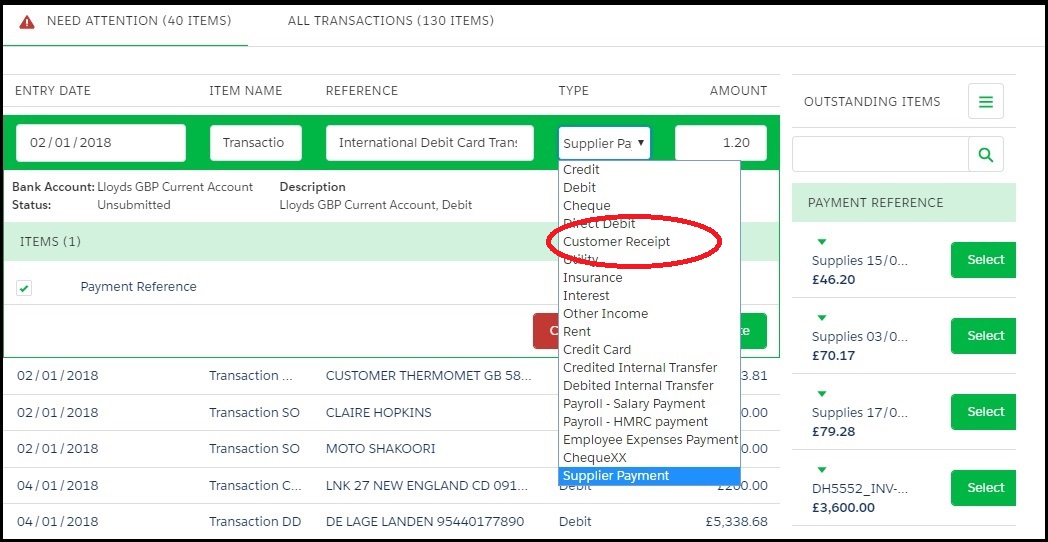
Normally you find out a sales invoice has been paid when the payment hits your bank account. You may get a Remittance Advice, but the easiest way to handle this is through Bank Matching.

Choose a TYPE of ‘Customer Receipt’ and match to the required Sales Invoice Number. This will do all the required postings:
 

This entry was posted in Sage Financials Premium. Bookmark the permalink.

Post navigation

← Sage Financials Partner Event
Bank Matching →

Stay updated

Recent Posts

  • What has changed with Accounting Seed
  • Export files from Sage Financials
  • An internal server error has occurred
  • Salesforce Platform options for your accounts
  • Product Focus: Sage Financials Cloud Archive
  • When would it be prudent to migrate from Sage Financials?
  • Sage Financials REPLACEMENT shortlist – Xero
  • Sage Financials REPLACEMENT shortlist
  • Bank Reconciliation & Bank Matching
  • Trial Installation Guide & User Guide for Bank Reconciliation
  • User Guide for Budget Grid
  • Bank Tag balance and Ledger Statement Balance
  • Christmas Fix for Bank Matching filters
  • Product Focus: Mark Paid
  • Sage Financials Reporting Explained – Sage Intelligence
9 Queens Rd, Brighton BN1 3WA
philip@alpha-index.com
+44 (0) 1273 777202

Sage Financials Know How
is a site by Alpha Index
Salesforce & Sage Experts

Zerif Lite Developed by ThemeIsle